NetSuite implementation is the systematic process of configuring, migrating data to, and deploying the Oracle NetSuite ERP platform. Understanding the NetSuite implementation timeline helps you prepare for what is ahead. Most methodologies follow a predictable rhythm: discovery and planning, design, development, testing, deployment, and support. When each stage is connected, users are trained, data is trusted, and the organization walks into go-live with confidence. The sections below map each phase of that journey from initial planning to post-launch support.
What Is NetSuite Implementation?
NetSuite implementation is the process of configuring the Oracle NetSuite ERP platform to match how your business operates. It involves setting up the software, moving critical business data, connecting other systems, and preparing users for the transition. NetSuite is a platform that can support finance, operations, customer relationships, and more in one cloud system. NetSuite's solutions allow organizations to run an entire business in the cloud with one unified software system.
Because NetSuite is customizable, two implementations rarely look the same. One company may need straightforward financials while another requires complex manufacturing or distribution workflows. That flexibility is why a defined implementation timeline matters. A proven methodology keeps the project moving while still adapting the platform to your specific environment.
The NetSuite Implementation Timeline at a Glance
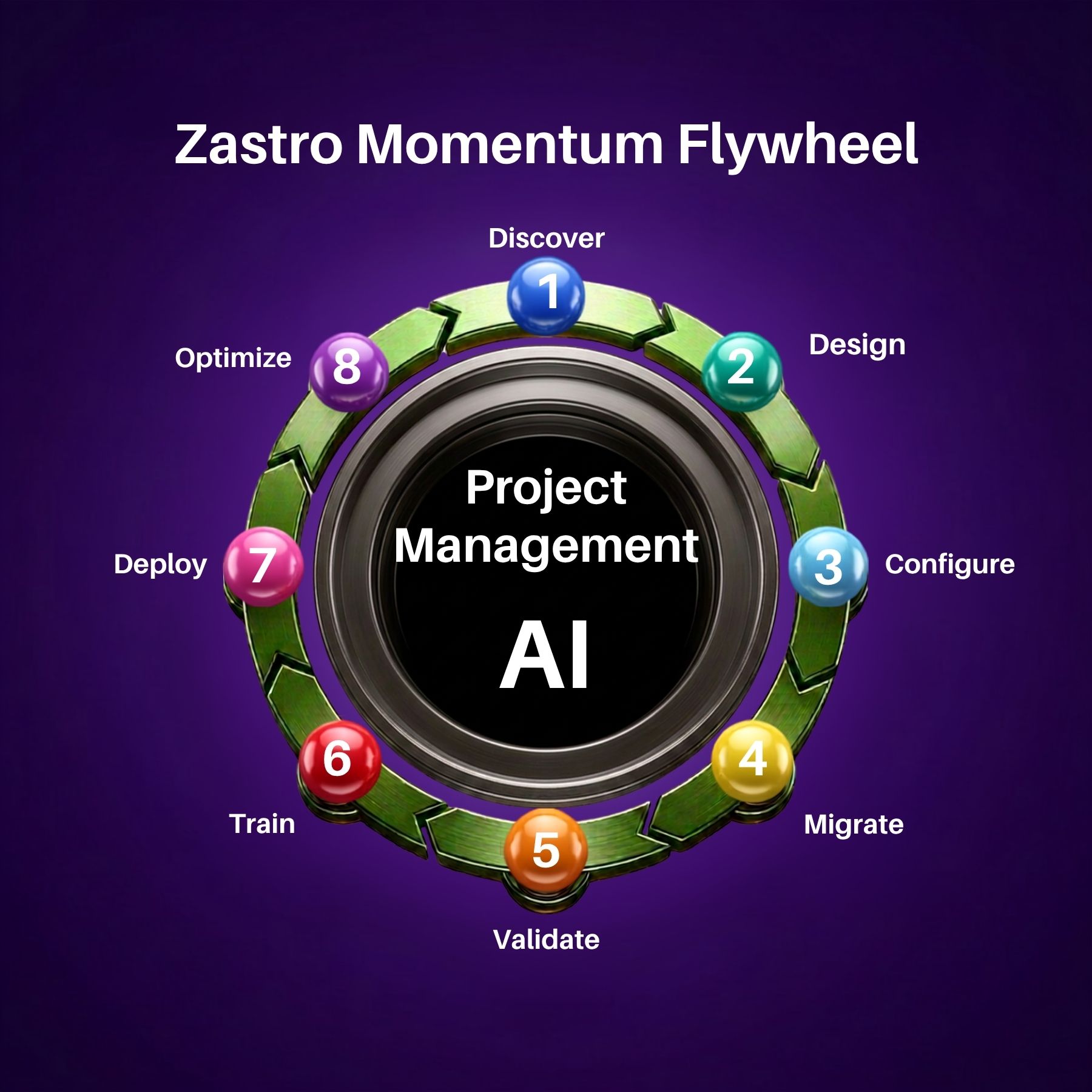
NetSuite projects are commonly broken into multiple stages. General ERP implementation plans include discovery and planning, design, development, testing, deployment, and support. NetSuite-specific guides describe similar stages, including envisioning and design, build, test, deploy, and user adoption. The Zastro Momentum Flywheel organizes this work into eight connected phases: Discover, Design, Configure, Migrate, Validate, Train, Deploy, and Optimize.
- Discover: Understand your business, goals, and challenges.
- Design: Create a solution blueprint aligned to your future state.
- Configure: Build NetSuite using proven leading practices.
- Migrate: Prepare and move critical business data.
- Validate: Confirm the solution works as designed.
- Train: Prepare users and drive adoption.
- Deploy: Execute a successful go-live.
- Optimize: Continuously improve and scale.
Phase by Phase: What Happens From Planning to Go-Live
The eight phases of the Momentum Flywheel are sequential, but they also overlap. Design work can begin while discovery documents are still being finalized, and migration planning can start before configuration is complete. The structure exists to create momentum while keeping each stage accountable.
Phase 1: Discover
Every successful NetSuite implementation begins with discovery. In this phase, the implementation team works to understand your business, its goals, and the challenges that prompted the move to a new ERP. Consultants review existing processes, identify disconnected systems, and document reporting gaps. Discovery creates the shared understanding that every later decision depends on. Skipping or rushing this phase usually leads to rework further down the timeline.
Phase 2: Design
The design phase translates discovery findings into a concrete solution blueprint. The blueprint describes the future state of your NetSuite environment, including how the system will be organized to support your workflows. Decisions made here shape configuration later in the project. A solid design phase reduces surprises during the build, because requirements have already been mapped to specific NetSuite capabilities and leading practices.
Phase 3: Configure
Configuration is when the NetSuite environment starts to feel like your system. The implementation team builds NetSuite using proven leading practices, turning the blueprint into a working environment. This phase is often called development in general ERP lifecycles. Because NetSuite is customizable, the team can set up the features and structures that match your business logic rather than accepting a default setup.
Phase 4: Migrate
Data migration is one of the most important steps in any NetSuite implementation. The goal is to prepare critical business data and move it into the new system. That means cleaning up duplicates, reconciling records, and validating what will carry over. Old data from spreadsheets, QuickBooks, or a previous ERP must be mapped carefully so the new system starts with information the organization can trust.
Phase 5: Validate
Validation is the testing stage. The implementation team confirms that the solution works as designed before users rely on it. Testing runs through the scenarios defined during discovery and design, checking that configurations, migrated data, and integrations behave correctly. Issues found here are resolved while the project is still in a controlled environment, which lowers the risk of problems appearing after go-live.
Phase 6: Train
Training prepares your team to work in NetSuite. The objective is to prepare users and drive adoption, and this phase should align with the roles people will actually perform. When employees understand where to find records, how to enter transactions, and why the new process was implemented, they are far more likely to embrace the change. Adoption is not automatic after go-live; it is built deliberately during this phase.
Phase 7: Deploy
Deployment is the go-live itself. The system is made available to the organization, and users begin their daily work in NetSuite. A successful deployment does not happen by accident. It depends on the configuration, clean data, and validation completed in earlier phases. Partners usually provide hands-on support during deployment so the team can address any immediate questions or issues in real time.
Phase 8: Optimize
The timeline does not end on go-live day. The final phase focuses on continuously improving and scaling the environment. Post-go-live support is part of a full-service implementation offering, and many implementation partners provide ongoing consulting, integrations, and help after launch. As users settle into the new system, optimization opportunities emerge, including better reporting, additional integrations, and process refinements that make NetSuite more valuable over time.

How to Keep Your NetSuite Implementation on Schedule
Even with a proven process, ERP projects can slow down. These practices help keep the NetSuite implementation timeline realistic and protect the momentum built in each phase.
- Involve the right stakeholders early so discovery captures real requirements the first time.
- Make data quality a priority before migration begins.
- Protect time for validation and testing, because defects found late are costly to fix.
- Treat training as a project deliverable, not an afterthought.
- Plan for post-go-live support so the project keeps improving after launch.
Frequently Asked Questions
Organizations evaluating NetSuite often ask the same practical questions about timing, structure, and what happens after launch.
How long does a typical NetSuite implementation take?
Most NetSuite projects follow a structured timeline of roughly 90 to 150 days, depending on scope, customization, data volume, and team availability. Simpler projects can move faster, while complex configurations and integrations extend the schedule. Your implementation partner should provide a more precise timeline after the discovery phase clarifies your business requirements.
What are the main phases of a NetSuite implementation?
NetSuite implementations can be organized into eight connected phases: Discover, Design, Configure, Migrate, Validate, Train, Deploy, and Optimize. These map to the broader ERP lifecycle of discovery and planning, design, development, testing, deployment, and support. Working through each phase in order keeps the project on track and helps ensure nothing important is missed.
What happens after NetSuite go-live?
Post-go-live support and optimization continue after deployment. The final phase of the ERP implementation lifecycle is support, where the partner helps resolve issues, refine the system, and identify improvements. Many organizations use this time to scale NetSuite further by adding integrations, improving reporting, or expanding into additional business functions based on real usage data.