Last month, we gave you a sneak peek at the Cash Management updates coming in NetSuite’s 2024 Release 2. Today, we are giving you a sneak peek at what’s new for Manufacturing, Warehouse, and Supply Operations.
New SuiteApps align supply and demand, monitor costs
The update includes three new SuiteApps that can assist manufacturers in controlling costs and proactively responding to potential component shortages.
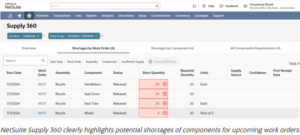
NetSuite Supply 360, one of the three new apps, makes it easier to see all the inventory needed to fulfill upcoming orders. The SuiteApp filters work orders by location and date. While at the same time, comparing the location’s on-hand and on-order inventory to highlight potential component shortages in an easy-to-understand table. Managers can view shortfalls by assembly, individual component, or work order.
Another new SuiteApp, NetSuite available to Build, shows how many of a particular assembly can be made with the current inventory. Available to Build evaluates both the final assembly and subassembly components so with a few simple clicks, manufacturers can determine what they can promise customers. This report is assessable from the sales order entry, bill of materials inquiry, and item 360 pages.
Cost Variance Analysis is the third new SuiteApp being released. This app compares the planned and actual costs of the work orders in a simple report. The tool will use green to highlight lower-than-expected costs and red to highlight higher-than-anticipated expenses, displaying variances in both dollars and as a percentage. Managers can click through the cost variance report to see how specific components, categories of costs, and conversion costs impact the final cost.
Increasing efficiency and reducing waste in the warehouse
NetSuite Warehouse Management System (WMS) and NetSuite Ship Central will include new features to help get orders out the door faster and cost-effectively while reducing lost inventory and orders.
WMS Bin Replacement Schedule allows managers to schedule automatic stock replenishment orders. The tool can filter inventory by item, item family, group or classification, or a specific saved search to schedule replenishments. Another update will allow employees to capture serial numbers for each product in a pallet of goods with a single scan during the receiving process.
In the latest version of Ship Central, the application can automatically choose the most cost-effective option for shipping an order to the customer by the promised delivery date.
Also included in the Ship Central update will be expanded label printing capabilities. When printing return shipping labels to be included in outbound orders, to make it easier for customers, different shipping methods can be printed on the return label than the shipping method on the outbound label. This update will also allow staff to customize labels to send hazmat items through USPS and DHL, ship alcohol, collect cash on delivery, and include trade codes, content explanations, and declarations for international shipments.
Other new features
NetSuite Supply Chain Management (SCM) Mobile
- Data tables in the SCM Mobile app showing work orders, sales orders, or other records can now be color-coded based on status, with green, yellow, and red signifying fulfilled, in process, and delayed orders.
- The ability to organize printers into groups in NetSuite SCM Mobile makes it easier for warehouse workers to always use nearby printers and not mistakenly send jobs to printers on the other side of the warehouse.
- Files and images can be uploaded to any custom record in NetSuite 2024.2 rather than just standard record types.
NetSuite Manufacturing Mobile
- Manufacturing Mobile will automatically populate lot and serial numbers when scanning GS1 barcodes, saving businesses that use these unique identifiers valuable time. In addition, Manufacturing Mobile can automatically generate lot numbers through an integration with the Lot Auto Numbering SuiteApp.
- To strengthen manufacturing controls, managers can require the assigned employee to swipe their badge to start and end any step in the manufacturing process, such as operating a machine. This also allows for more precise tracking of who completed each step and how long it took them.
NetSuite Quality Management
- NetSuite Quality Management now offers enhanced controls that allow only the assigned employee to complete the inspection and prevent other employees from changing inspection data after it’s complete.
- Quality managers can now choose the transaction type (such as item receipt or item fulfillment) and the parent transaction (such as purchase order or transfer order) that triggers inspections. This allows you to be more selective about what ends up in your inspection queue and prevents unnecessary inspections.
- A new Quality subtab within various NetSuite transactions makes it easy to monitor the status of different inspections. The system also includes links to inventory transaction records allowing a quick view of other product details.
- You can now schedule inspections for items sold by quantity, such as pounds or feet.
Supply Planning
- Minimum order quantity no longer acts as your lot size when using the supply planning functionality within NetSuite Material Requirements Planning (MRP). This ability to choose different numbers for minimum order quantity and lot size gives supply chain managers more flexibility when planning purchase orders. For example, if your order minimum is 12 but you produce in multiples of six, you can adjust plans in multiples of six instead of 12. This minimum quantity can also be paired with fixed lots, fixed lot multiples, and periods of supply. If you sell in lots of 10, for instance, but the minimum order quantity is 20, you could set the minimum fixed lots at two.
- The latest release extends demand planning horizons and purchases lead times from one year to three years.
- The Supply Planning Workbench includes separate filters for firm and unfirm supply orders in the 2024.2 release. This helps supply chain managers better see how changes to unfirm orders—those that have not yet been placed—will impact the plan.
This is just a summary of some of the features in NetSuite 2024 Release 2. The Zastro team is continuing to learn about the enhancements and preparing to share how you and your company will benefit from the updates.
Let's Talk About NetSuite
The preceding is intended to outline our general product direction. It is intended for information purposes only, and may not be incorporated into any contract. It is not a commitment to deliver any material, code, or functionality, and should not be relied upon in making purchasing decisions. The development, release, timing, and pricing of any features or functionality described for Oracle’s products may change and remain at the sole discretion of Oracle Corporation.